
Did you know you can easily set up policy renewals in LACHS 4 and 5?
This will save you from having to create new policies individually.
Check out the steps below that demonstrate how to complete the policy renewal process:
- Run the Policy Renewal procedure
- Open up a policy form
- Click on Policy > Renewal
- Select the year you want to renew (i.e. to create 2009’s policies, select 2008 from the Year to Renew list)
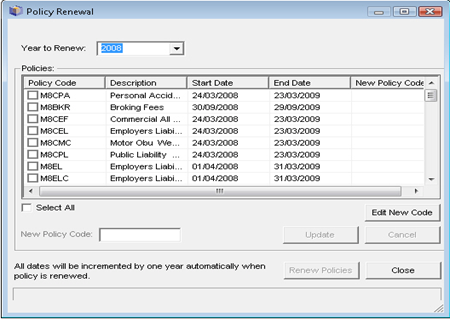
- Select the policies you wish to renew by ticking each that apply or to renew all policies check the Select All check box
- The system will suggest a New Policy Code
- This can be overwritten by highlighting the appropriate policy and clicking on Edit New Code and changing the values in New Policy Code and clicking on Update
- When ready, click on Renew Policies to create all of the selected policy records
- Close the form when completed
NOTE: Each policy will have been created, with the new policy dates being increased by 12 months. All other policy information, such as premiums and excesses will need to be individually updated in the policy records.
LACHS Version 5 users will need to ensure that the new policy year has been created prior to running the renewal.
Policy years are added by going to:
- Configuration

- Tables
- Policy Year

- Click New Table Item

- Enter new Policy Year Code and Description

